
Setting up debian 11 (bullseye) on an Dell Optiplex 7030
The engine turns but doesn’t start
Following a variety of doc’s found on the webs, it should ‘just work’.
I could install a variety of other distributions (ex: alpine, ubuntu) and they would boot fine after install.
Debian 11 would just not play well.
After a few days of trial and error, here was the comment that opened the door for me.
I was just having this exact issue with the same Debian version and computer, and here are the steps from default bios setup to working Debian that I took:
- in bios settings, make sure to have the drive in AHCI mode instead of RAID (I’m pretty sure you figured this out already though)
- choose to use the advanced installer
- go through the steps as normal (you might need to find a tutorial about Debian advanced installation if things don’t make sense)
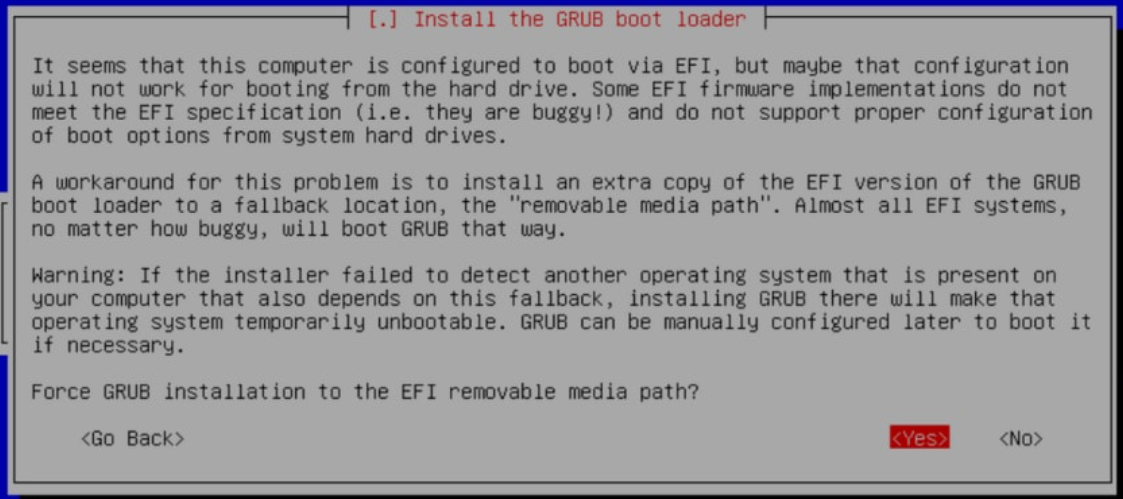
- when you get to installing GRUB, there will be a box asking you if you want to force installing to a location for “buggy implementations” of UEFI, make sure to check this!
- after you finish the installation, you should be able to reboot into your new Debian PC ☺
I follow the instructions on using expert mode for a minimal install that are here
The question box regarding buggy implementation looks something like
Written on October 30, 2022